


Uncover business- critical insights with social listening for every team.
Vista Social listening tools help brands of all sizes monitor social conversation to extract actionable insights and improve brand health.
Complete the workflow with Analytics and Engagement.
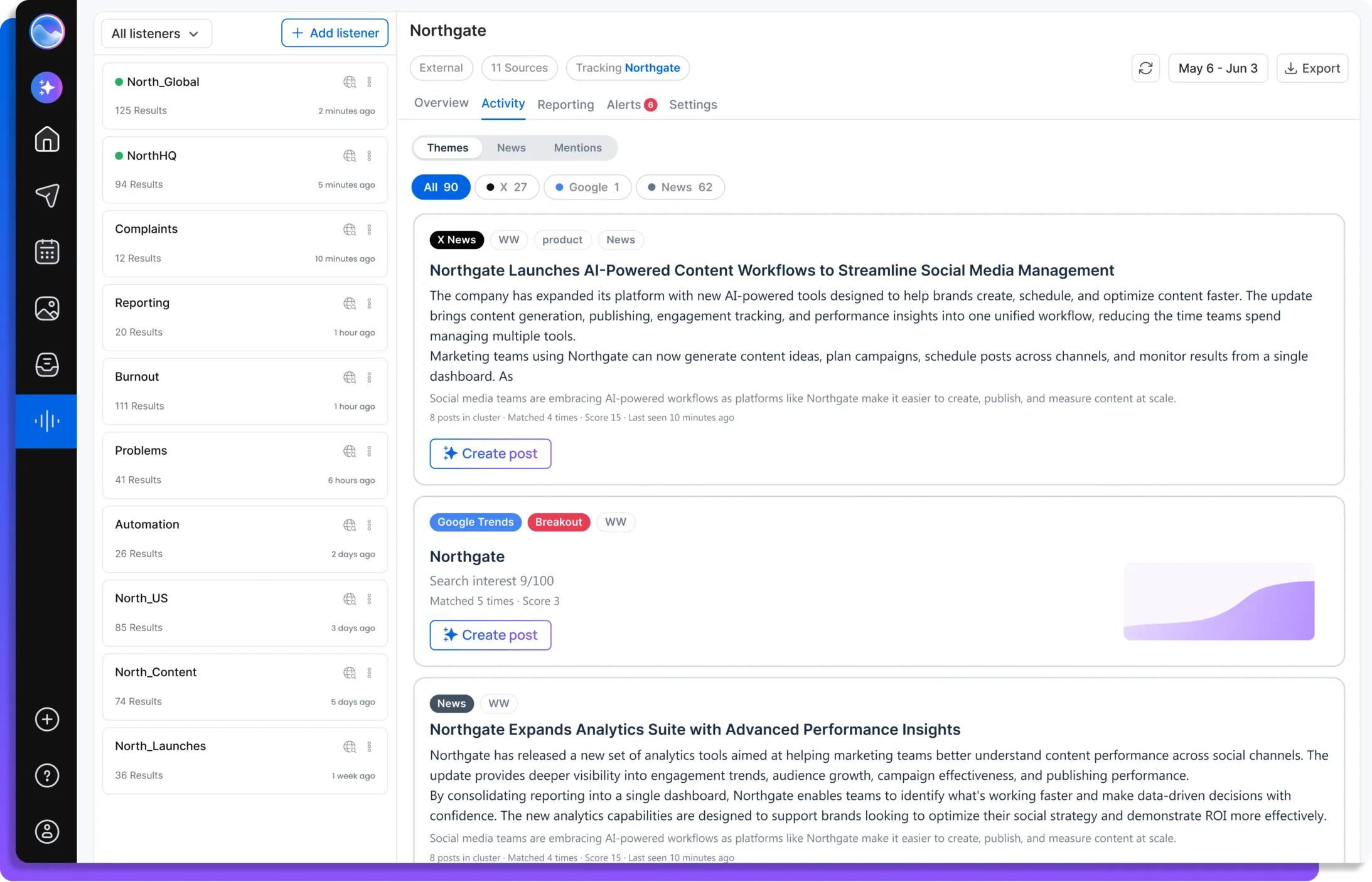
Trusted by teams at
Ignore the noise. Move on validated signals.
Vista Social confirms every story across X, Google, YouTube, and the news, then scores with an advanced algorithm to validate what matters. You capitalize on what's real, not what's loud.
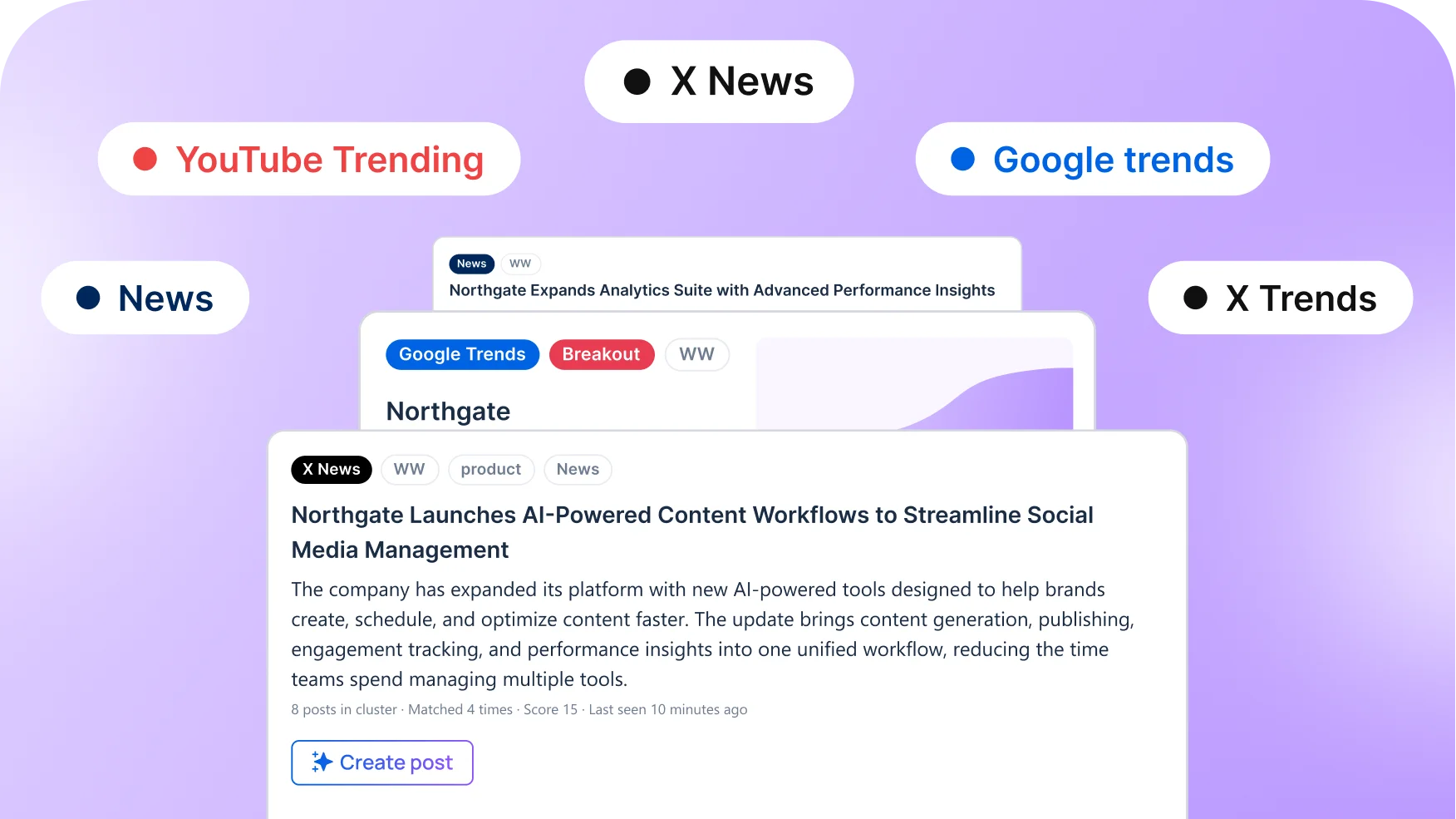
See what’s trending, every channel, one place.
Millions of conversations across social, search, and news, distilled into
one view of what's happening around your topics, and why.

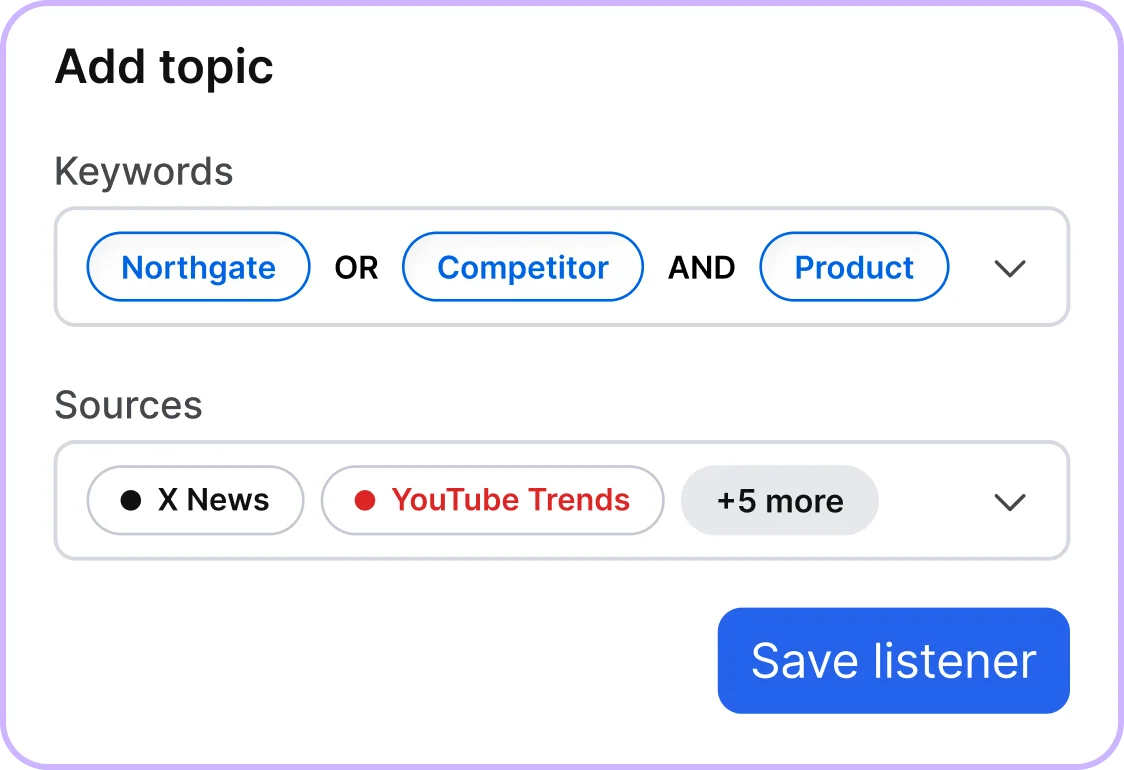
Set and monitor any topic in minutes.
Monitor every major social network, news source, the open web, and review sites from a single topic.
Analyze billions of data points in a matter of seconds, giving you immediate access to massive amounts of information.
Refine your data and results dynamically in real time and adjust parameters without the hassle of rewriting search queries.
Get instant, data-driven answers that drive your social strategy.
Is this a real trend or just noise?
The Convergence Score (0-100) and multi-source confirmation show what’s validated before you act.
Which platforms is this trending on?
Source chips on every story show exactly where it’s confirmed: X, YouTube, Google, news, and more.
Is interest rising, steady, or breaking out?
See activity signals plus related queries people are searching for ready-made content and ad angles.
What should I actually do about this?
An AI summary turns each topic into a headline, a short narrative, key highlights, and suggested actions.
Who’s talking about us or our competitors?
Persistent, keyword-based monitoring across social, news, reviews, and the open web.
Can you tell me when something moves?
Real-time alerts (new trending theme, multi-source story, volume spike, influencer hit) by email, in-app, and Slack.
Go from trend data to timely social content
in one platform.
No more juggling Google Trends, a feed, a news reader, and a spreadsheet.
One platform, from signal to published post.
1
Discover
See what's trending in your region and industry in one dashboard.
2
Track
Set any topic or keyword, then Vista Social tracks engagement in real time.
3
Spot Trends
The moment a theme moves and hits multiple sources, your team gets alerted.
4
Decide
Open the auto-refreshing AI summary with suggested actions.
5
Act
Move straight into publishing and engagement with AI-powered recommendations.
Always be first to a moment with alerts.
Vista Social alerts the second your brand trends, sentiment dips, the press moves in, or a story validates across sources. You always find out while it's still an opportunity.

Volume spike
A fresh topic about your keywords just started trending.
Balanced sensitivity
60m window

Sentiment dip
Sentiment around your brand mentions is turning negative.
Sensitive sensitivity
60m window

New trending theme
A fresh topic about your keywords just started trending.
Strict sensitivity
180m window

Crisis keyword
Crisis-related terms detected in conversations about you.
2 Key words
Whole word

Multi-source story
A story was just validated across multiple platforms, making it your highest-confidence signal.
≥3 sources
30m window

Influencer hit
A high-reach account just mentioned your brand.
≥50k followers
30m window
Enterprise-grade intelligence without the enterprise bill.
The market read that used to need an analyst team and a six-figure contract.
Now it's on every Vista Social plan.

Brand, competitor & category monitoring across social, news, reviews, and the open web
Reporting with composite scoring, PDF/CSV export, and shareable live reports
Real-time alerts: volume spike, new theme, multi-source story, influencer hit, crisis keywords
Convergence Score: multi-source trend confirmation (unique to Vista Social)
Sentiment on brand mentions: multi-region and multi-language coverage
Conversational discovery via Ask Vista
| Platform | What listening costs | Purchase model |
|---|---|---|
Platform Vista Social Vista Social | What listening costs$75/month - $150/month | Purchase modelSelf-Serve · No Call · No Contract |
Platform Brandwatch Brandwatch | What listening costs$1K-$12K+/month | Purchase modelSales-Led · Annual contract |
Platform Talkwalker Talkwalker | What listening costs800m-$8K+/month | Purchase modelSales-led · Custom quote |
Platform Sprinklr Sprinklr | What listening costs$5K+/month | Purchase modelEnterprise-only |
Platform Sprout Social Sprout Social | What listening costs$500+/month | Purchase model$/mo Listening Add-On |
Listening that adapts to how your team works.
Not the other way around.
Agencies
Enterprise-grade, multi-source intelligence you can deploy across every client.
Brands & in-house teams
The capability of a six-figure suite, live in minutes instead of a quarter.
Brand health
Monitor conversations around your brand, products, and leadership across every channel.
Crisis management
Real-time alerts and sentiment so you're never caught off guard.
Competitor & category
Track competitors and spot industry trends the moment they break, with validation across sources.
Consumer & campaign research
Understand audience language and measure how campaigns actually land.
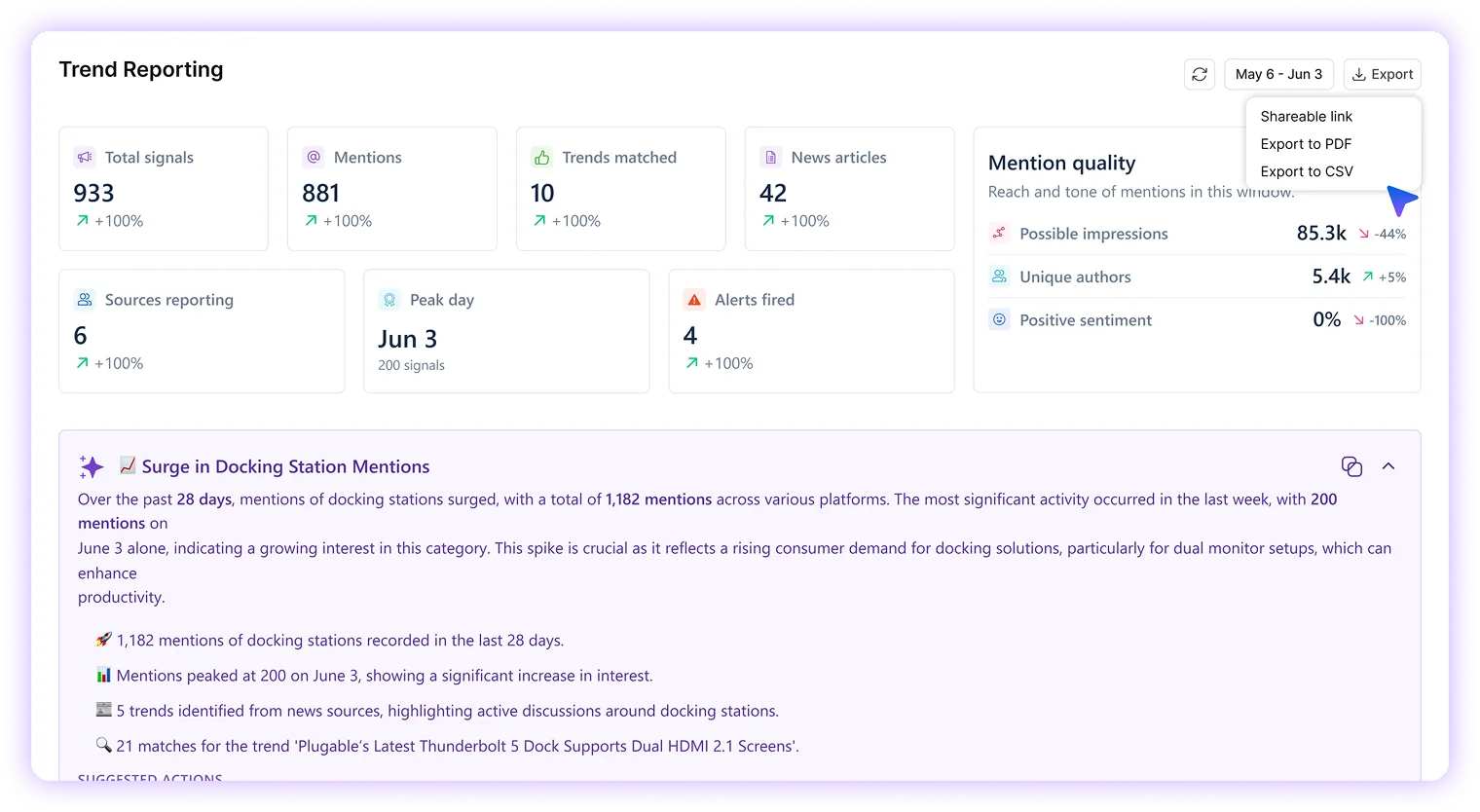
Report what’s happening, backed by data.
Activity and sentiment over time, source distribution, automatically built into reporting you hand a client or a CMO with confidence.
See what's moving around your brand and industry, right now.
Get a guided tour of Vista Social listening. Book a demo to see how it works, then start your 14-day free trial when you're ready.
P.S. It will be a piece of cake 🍰 with Vista Social
Frequently asked questions
What is a listener?

A listener is a saved topic that Vista Social monitors for you continuously. You give it keywords, such as your brand, a competitor, or a category, and it captures mentions and trending stories about them over time, scores them, and alerts you when something matters. You can also run a quick, one-off "what's trending right now" search without saving a listener.
Where do listeners get their data, or is it just one platform?
Listeners pull signals from five sources: X Trends, X News, YouTube, Google Search and Trends, and the open news web. They then deduplicate the same story across those sources. A topic confirmed by four sources counts as real signal, while a spike on a single source is treated as noise until something else confirms it.
How do I know a trend is real and not just noise?
Every story gets a composite score from 0 to 100 based on how many sources confirm it, how recent it is, and how much volume it is seeing. Source chips show exactly which platforms backed it up, for example "Confirmed by X News, Google, 3 publishers, score 87." The more sources that confirm a story, the higher the score and the more confidence you can put behind it.
What types of listeners are there?
There are two kinds. Internal listeners track mentions and conversations on your own connected profiles. External listeners cover brand, competitor, and category monitoring across the open web and trend sources. The old standalone "Trends" type is now part of the external listener, so everything works the same way.
Can I pause a listener without losing it?
Yes. Every listener moves through an active, paused, or archived state. Pausing stops the scanning but keeps the listener and its slot, so you can pick it back up whenever you want, which is handy when a campaign is on hold. Archiving is the permanent option and will not resume by accident. Status dots show you where each one stands at a glance: green for active, gray for paused, and a pulsing dot while it is still warming up.
What can listeners alert me about, and how do I get the alerts?
Listeners come with six alert types: volume spike, sentiment dip, new trending theme, multi-source story (your highest-confidence signal), influencer hit, and crisis keyword. Right now alerts arrive by email and in the app. They are shared with your team and can be acknowledged, so two people do not end up working the same one, and a cooldown keeps a continuing spike from firing over and over. Slack and webhook delivery, along with daily digests, are coming soon.
How does sentiment work on a listener?
Sentiment is topic-aware. The listener understands what it is tracking and ignores unrelated namesakes, so a listener watching Drake the musician will not count posts about Drake the duck as negative mentions. That means an off-topic flood cannot set off a false sentiment-dip alert or bury a real one. One thing to keep in mind: sentiment is currently measured on brand mentions, not on the trend story itself.
What reporting and exports do listeners offer?
Each listener has a full report covering a KPI band, an AI summary, an activity pulse, a sentiment trajectory, top signals, and how the source mix shifts over time. You can share it as a link, save it as a PDF, or export a detailed CSV, which comes as a zip of analysis sheets for mentions, trends, news articles and publishers, coverage, alerts, sentiment, and source share. Reports also follow any templates you have saved, including section order, titles, and hidden sections.
Can a listener turn a trend into a post?
Yes. Every trend card has a one-click Create Post button. You choose an angle and tone, optionally generate a matching image or attach the source link, and the composer opens already filled in with a caption written in your brand voice and grounded in that story's real details. A badge that links the trend to the post you published is on the way.
Can I use listeners conversationally through Ask Vista?
Yes. You can ask things like "What's trending in beauty in the UK right now?", set up monitoring, or check in with "What did my listener catch this week?" Ask Vista answers with trend cards right there in the conversation, so you do not have to dig through a dashboard.
How does this compare to enterprise listening tools on price?
Most serious listening tools are priced for enterprises and locked behind annual contracts. Brandwatch runs roughly $10K to $150K and up per year, Meltwater around $6K to $25K and up, and Sprout's listening is about a $999 a month add-on on top of its per-seat pricing. Vista Social builds multi-source trend intelligence right into the platform, so you are up and running in minutes with no sales call and no implementation fee.
How much do listeners cost?
Listeners are priced per listener, per month, across three tiers based on how much data each one pulls. Tier 1 is $75 a month per listener with 10+ sources, 15K results per month, and 50 results per source per day. Tier 2 is $150 a month per listener with 10+ sources, 45K results per month, and 150 results per source per day. Tier 3 is $250 a month per listener with 10+ sources, 120K results per month, and 400 results per source per day. Every tier pulls from the same sources with full cross-source confirmation, scoring, alerts, and reporting. Higher tiers simply raise how many results each listener can capture per day and per month.
Which listener tier should I choose?
Pick based on volume rather than features, since every tier includes the same multi-source intelligence, alerts, sentiment, and reporting. Tier 1 ($75) suits niche brands, a single competitor, or low-chatter topics where 50 results per source per day is plenty. Tier 2 ($150) fits active brands and busier categories that need more headroom at 150 per source per day and 45K per month. Tier 3 ($250) is for high-volume brands, broad categories, or crisis-prone topics where you do not want to miss anything, at 400 per source per day and 120K per month. If a listener keeps hitting its daily or monthly cap, that is a good sign it is time to move it up a tier.


The most complete social media management platform for teams who demand more.






Tools
PublishingAnalyticsEngagementIntegrations
FacebookInstagramLinkedInRedditSnapchatThreadsTikTokX (Twitter)YouTubeMCPVista Page (link-in-bio)All IntegrationsCopyright © 2026 Vista Social LLC. All Rights Reserved.