

Published on May 26, 2026
13 min to read
How to Use the Instagram Appeal Form for Banned Profiles

Summarize with AI

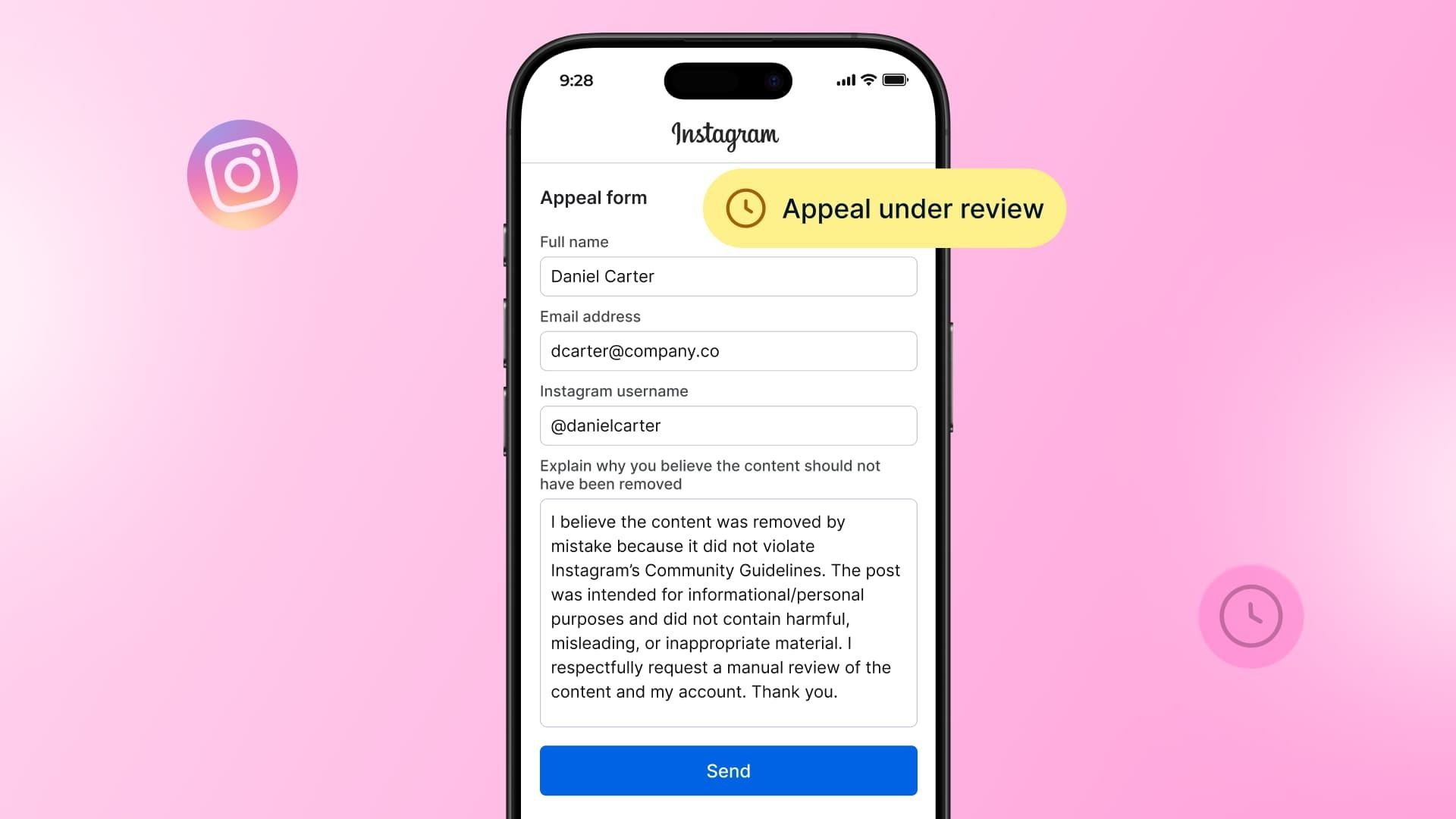
Table of contents
Summarize with AI

ChatGPT

Claude

Perplexity
Share

Vista Social

X (Twitter)


Your Instagram account just got disabled. You opened the app expecting the usual feed and instead you’re staring at a grey screen with a notice telling you your account has been disabled, a date of deactivation, and a countdown before everything is gone for good.
What happens next matters more than most people realize. Instagram gives you a limited window to submit an appeal before your content, followers, DMs, and account data are permanently deleted, and the form you use and what you actually write in it makes a real difference in whether that appeal gets a yes or gets auto-denied.
This guide covers exactly which Instagram appeal form applies to your situation, what to write in your explanation (including templates you can adapt), and what to do when Instagram doesn’t respond.
Table of contents
Why does Instagram ban accounts?
Instagram usually disables accounts that violate its Terms of Use or Community Guidelines. Most mild cases are issued warnings, whereas serious cases and repeated violations may result in immediate bans.
Below are some examples of common violations that could get your Instagram account disabled:
- Impersonating another person or brand and spreading false information
- Posting content that supports or praises acts of terrorism, crime, and hate groups
- Selling or buying illegal substances, tobacco products, live animals, alcohol, firearms, or sexual services
- Publishing copyrighted content without the original creator’s permission (musical scores, books, songs, movies, paintings, photographs, etc.)
- Sharing posts containing real, credible threats, hate speech, or any other form of online harassment
- Unsafe content involving minors and children
- Creating an Instagram account with fake personal information (age, name, etc.)
- Publishing offensive or discriminatory content targeting Instagram users based on their ethnicity, sexual orientation, gender, religious affiliation, health condition, or race
- Posts that promote, praise, or glorify violence or self-harm in any form (if the content is shared to raise awareness, condemn, or educate, insert a warning in your caption)
If your Instagram account is blocked for a violation (or repeated violations) of its TOS or Community Guidelines, you won’t be able to log in.
Instead, you’ll see an account suspension notice, like the one below.
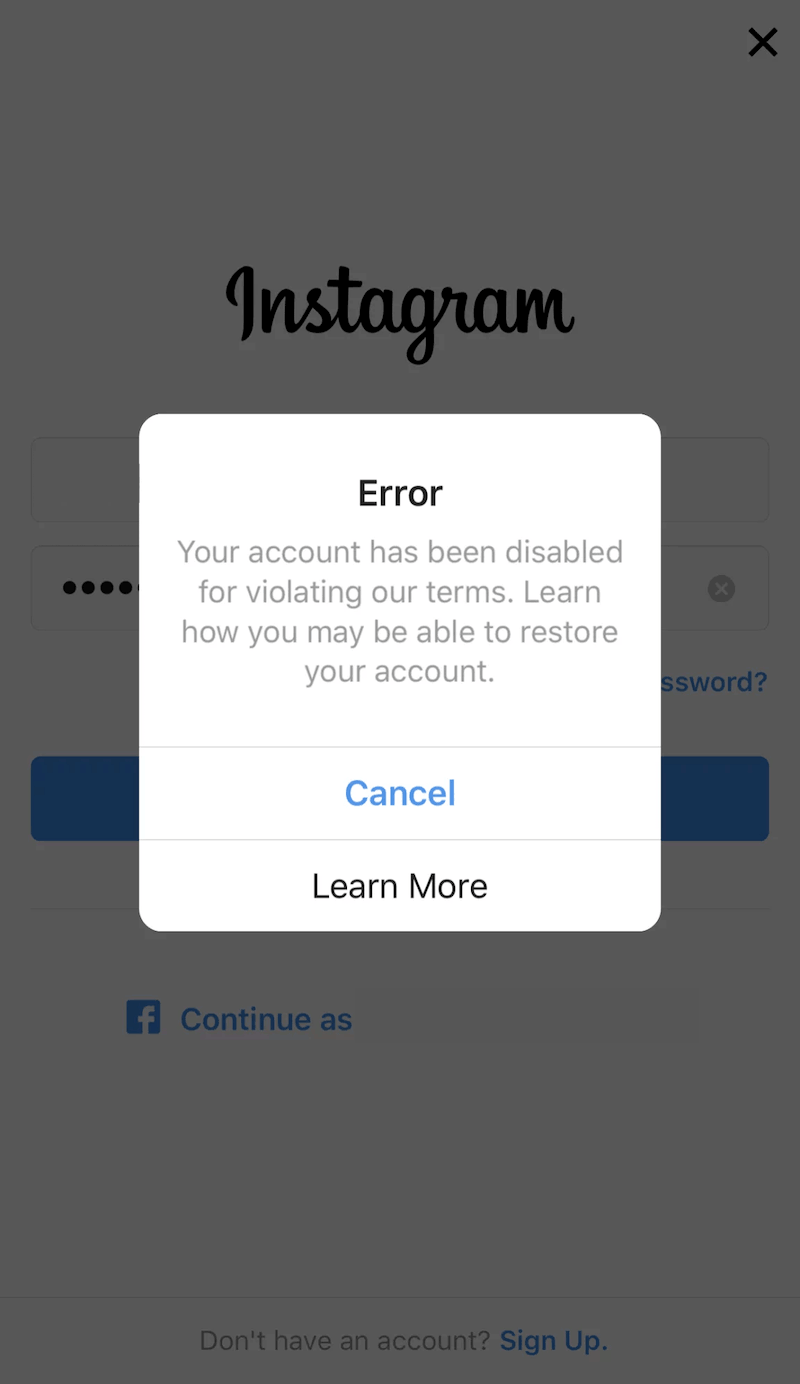
Act fast when you get this notification. Tap Learn More (or whatever the button available to you says) to get all the information about your violation as possible.
Remember, not all appeals are granted, especially banned accounts that are ignored after a certain period of time.
Most Instagram users have 30 days to send an appeal and regain access to their disabled account. If you fail to respond within this period, your account will be permanently disabled—deleting all your content, followers, direct messages, and account information.
What does your Instagram ban message mean?
Instagram’s error messages are deliberately vague, but each phrase points to a different violation type and a different appeal path. Using the wrong appeal for your situation is one of the most common reasons appeals get ignored.
The table below maps the most common messages to their likely causes and the correct next step:
| What you see | What it likely means | Which appeal to use |
| “We suspended your account” | Repeated Community Guidelines violations | In-app “Request Review” button |
| “Your account has been disabled” | Single serious violation or rights-related issue | In-app appeal or online form for Community Guidelines |
| “Account disabled for not following Terms” | Terms of Service violation — often third-party apps or fake engagement | In-app appeal; remove suspect third-party apps first |
| “We’ve removed your account” | Permanent ban for severe or repeated violations | In-app review, then escalate via Meta Business Support if no response |
| “Temporarily blocked from this action” | Action restriction, not a full disable | Wait 24–72 hrs; no appeal form needed unless it persists |
If you can’t find a “Request Review” or “Disagree with Decision” button when you try to log in, your account may have already passed the appeal window or received a permanent enforcement decision. Skip ahead to the “What to do if you don’t hear back” section for escalation options.
Potential impact of an Instagram profile ban
If your business relies heavily on Instagram for marketing and customer engagement, having your profile banned can impact your online presence and revenue.
Below are other potential outcomes of banned IG profiles:
- Loss of followers and engagement: If your profile gets banned, your followers won’t be able to see your content or message you. This can result in a significant drop in engagement and brand presence, and rebuilding from a new account means starting from scratch.
- Traffic and revenue impact: A profile ban can seriously reduce sales and traffic, particularly if Instagram is a primary channel for driving visitors to your website or online store. You’ll miss out on potential customers who discover you through the platform.
- Reputation damage: A profile ban can also affect brand reputation, since it can appear to outsiders that you violated Instagram’s terms. Negative feedback in other channels can follow.
- Regaining access can be difficult: Instagram’s review process takes time, and the outcome is not guaranteed. Unsuccessful appeals can result in permanent account deactivation, disrupting business operations and cutting off significant growth channels.
How to recover a disabled Instagram account
In the past, users could rely on various standalone web forms hidden across the Instagram Help Center to appeal a ban. Meta has officially retired and blocked these external links. Today, the appeal process is handled entirely within the platform’s native ecosystem.
If your account is disabled, your recovery options depend strictly on what you see when you attempt to log in.
Step 1: Trigger the native in-app appeal
Open the Instagram app on your primary mobile device and enter your login credentials. Because your account is disabled, you’ll be blocked by a grey notification screen.
- Tap the Disagree with Decision or Request Review button directly on that screen.
- Follow the on-screen automated prompts to confirm your identity. This typically requires confirming your phone number via an SMS text code.
Step 2: The mugshot selfie verification (watch your email)
Once you trigger the review request inside the app, Meta’s automated security system will flag your registration email.
- Look for an email from Instagram containing a 5-digit verification code.
- You’ll be instructed to take a clear, well-lit photo of yourself holding a clean sheet of white paper. On that paper, you must handwrite the 5-digit code, your full name, and your exact Instagram username.
- Reply directly to that automated email with your photo attached as a JPEG.
Step 3: What to do of the in-app button fails
If your app is glitching, crashing, or simply won’t display a “Request Review” option, do not wait for the 30-day deletion clock to run out. Because web forms are dead, your only alternative recovery routes are human escalations:
- Meta Verified Support: If you have another active Instagram or Facebook account with a paid Meta Verified subscription, use the direct chat support access to submit your banned username to a live agent.
- Meta Business Suite Support: If your banned account was tied to a Meta Business Manager that runs active advertising, open a support ticket via your ad manager portal to get a human reviewer to manually look at the false positive case.
What to write in your Instagram appeal
The explanation field in your appeal is where most attempts either build a case or lose the reviewer’s attention. Meta’s review teams, whether automated or human, are looking for a clear, specific, and factual explanation.
Vague messages like “I didn’t do anything wrong” or an unsupported claim that your account was hacked are among the fastest ways to get an auto-denial.
Below are three templates matched to the most common wrongful ban scenarios. Adapt them with your specific details before submitting.
Template 1: Account disabled by mistake (no clear reason given)
📋 Copy and adapt this template:
My account @[username] was disabled on [date]. I have not violated Instagram’s Community Guidelines or Terms of Service. I have never purchased followers, used unauthorized third-party apps, or posted content that violates Instagram’s policies. I have been an active member of the Instagram community since [year] and have always followed platform rules. I believe this was an automated error. I am requesting that a human reviewer assess my account and reinstate it. I am happy to provide any additional verification needed.
Template 2: Copyright or intellectual property violation
📋 Copy and adapt this template:
My account @[username] was disabled following a copyright claim on [content type]. I am the original creator and rights holder of this content. [Describe the content and your right to post it in one or two sentences.] I have attached documentation demonstrating my right to use this material. I am requesting a human review of this decision and the reinstatement of my account.
Template 3: Account was hacked and posted violating content
📋 Copy and adapt this template:
My account @[username] was compromised by an unauthorized party on or around [date]. The content that violated Instagram’s guidelines was posted without my knowledge or consent. I have since secured my account by [changing my password / enabling two-factor authentication / revoking access to third-party apps]. I am requesting that these violations be reversed and my account reinstated, as I was not responsible for the content in question.
A few things to keep in mind when writing your appeal:
- Be specific about dates, content type, and your account history
- Only claim your account was hacked if it actually was, since Instagram can cross-reference login data, device IDs, and IP addresses
- Keep the tone factual rather than emotional
- If you have documentation such as content permissions or screenshots, reference it and upload it with your form
Disabled Instagram accounts: 6 ways to avoid getting banned
The best way to fix a disabled Instagram account is to prevent the ban from happening in the first place.
Here are six ways to publish safely and avoid getting blocked on Instagram.
1. Review the Instagram community guidelines
Read the Instagram Terms of Service and Community Guidelines thoroughly to polish your content publishing strategy. Incorporate a brand safety component into your workflow and make sure nothing goes live that could compromise your standing on the platform.
2. Change the Instagram username
Make sure your Instagram username won’t be perceived as offensive, discriminatory, or hateful by specific demographics. Your username may be allowed today but could lead to account deactivation if enough users report it.
Instagram lets you change an account’s username in-app or through a desktop browser. Go to your profile, tap Edit profile, update the username, and click Submit.
3. Unlink the account from services that sell followers
Unsubscribe from any third-party app or service that generates fake engagement (bot followers, likes, or comments), scrapes content, or performs bulk follow-unfollow activity.
Safe third-party tools that can remain linked to your account include social media listening tools, scheduling tools, graphic design tools, and analytics platforms.
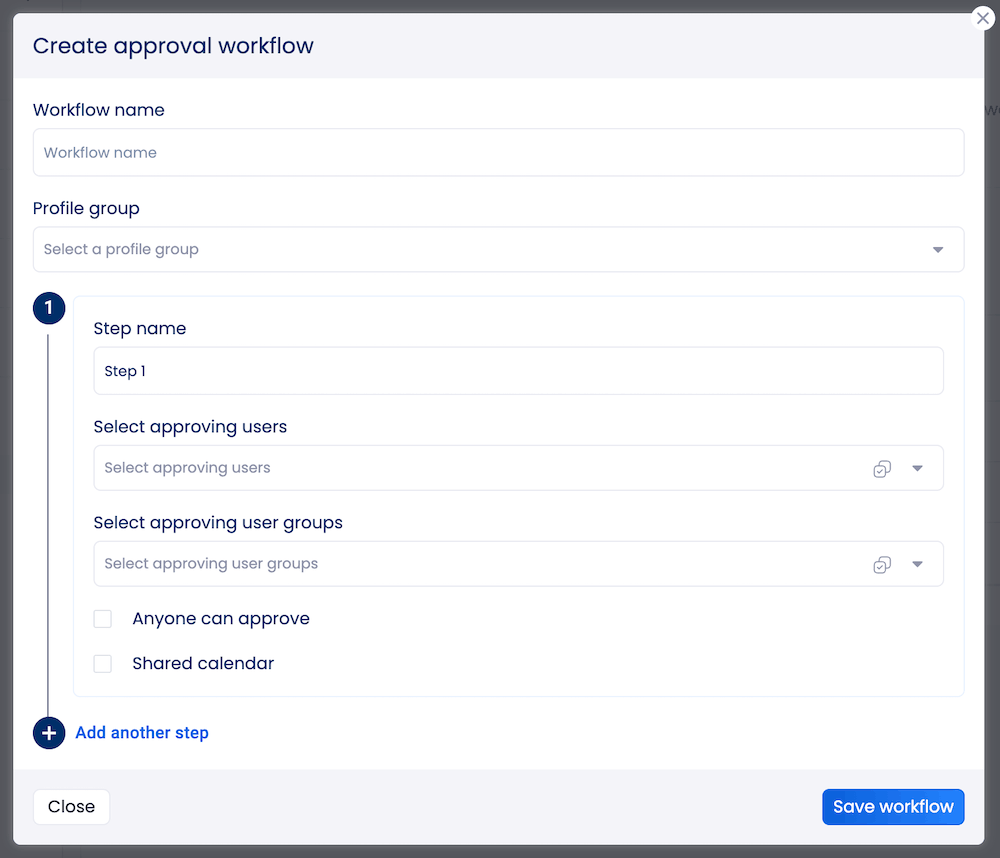
4. Create an internal approval workflow
Get your team involved in the approval process before content goes live. Rather than scheduling posts immediately, save them as drafts and run them through a review step first.
Vista Social’s approval workflows let teams assign content for review before publishing, keeping a second set of eyes between your content and any potential violations.
5. Be careful with user-generated content (UGC)
Always get permission before featuring or publishing someone else’s content, especially if it wasn’t clearly created for reposting. Even if your brand is mentioned, ask for the original creator’s written permission and keep a record of it.
6. Improve your Instagram content strategy
Build toward organic, sustainable Instagram growth using these practices:
- Share UGC as Stories: Spreading curated content as Stories reduces copyright risk. Use the correct Instagram Story dimensions to make the original creator’s handle visible.
- Develop brand-safe language guidelines: Establish clear guidelines to help your team write captions, replies, and descriptions that stay within Instagram’s policies.
- Understand your audience: Use your Instagram analytics to identify your top followers and analyze the content types that perform best. It helps you create more of what works and less of what could backfire.
Tips to help ensure Instagram accounts get unbanned
Getting your Instagram accounts unbanned can be a difficult and frustrating process, but there are steps you can take to increase your chances of success.
Check out the following:
- Understand why your account was disabled: Before taking any action, identify the specific reason. Instagram may have flagged the account for violating its terms of service, using bots or fake engagement, or posting content that breaks Community Guidelines.
- Submit your appeal promptly: Once you know why your account was banned, submit an appeal through Instagram’s Help Center. Provide your account username, email address, and a specific explanation of why you believe the account was wrongly banned or disabled in error.
- Contact Instagram directly: If you don’t hear back within a few days, try reaching out through the Instagram app: Settings > Help > Report a Problem.
- Change the behavior that triggered the ban: If the account was disabled for violating Instagram’s terms, address the root cause before appealing, whether that means removing certain content, disconnecting third-party apps, or changing your engagement patterns.
- Be patient but act within the window: In some cases, Instagram requires time before reinstating an account. Wait a few days between attempts, but never let the 30-day appeal window expire without making at least one formal submission.
Remain calm and persistent and take the necessary steps to show Instagram that your brand account is committed to following their rules and guidelines.
What not to do while waiting for the ban to be lifted
It can be tempting to look for shortcuts or quick fixes when an account is disabled, but most of the workarounds circulating online create more problems than they solve.
The most important things to avoid:
- Don’t use paid “recovery” services: Anyone offering to recover your Instagram account for a fee is almost certainly a scammer. Instagram account reinstatement is handled exclusively through Instagram’s own appeals process and cannot be facilitated by third parties.
- Don’t create a new account immediately: Creating a replacement account while your original is under review can signal to Instagram’s automated systems that you’re attempting to evade enforcement. This can result in the new account being disabled as well.
- Don’t spam the appeal form: Submitting multiple appeals back-to-back can reset your position in the review queue and may flag your case as low-priority. Submit once, wait for the review period to pass, then escalate through a different channel if there is no response.
- Don’t ignore the 30-day window: This is non-negotiable. Once the window closes, Instagram permanently deletes the account and all its content. Set a calendar reminder if needed.
What to do if you don’t hear back after submitting the Instagram appeal form
If your appeal goes quiet for more than five business days, the standard process has not worked and it’s time to escalate. The in-app appeal is reviewed by the same automated system that disabled your account in the first place. The goal of escalation is to get a human reviewer to look at your case.
Here are the most effective escalation paths in 2026.
Meta Business Support
If you run Facebook or Instagram ads, or manage a Meta Business Manager account linked to your Instagram, you may have access to live chat through the Meta Business Help Center.
Log in with your Facebook account, navigate to the Support section, and look for a chat option. Meta prioritizes accounts with advertising spend. If you reach a live agent, explain that the account suspension is affecting your business activity.
Reps can forward your case to a specialized review team, and users have reported resolutions within 24–72 hours through this channel.
Meta Verified
Meta’s paid verification subscription includes direct support access. This has been most effective for straightforward false positives where an automated system clearly flagged the wrong account.
As of 2026, Meta Verified support has become more limited in scope for suspension cases, with many users receiving standardized responses for policy-based decisions.
It remains more useful than no escalation, particularly when you can clearly demonstrate the account was disabled in error.
The Oversight Board
For decisions you believe violate Meta’s own policies or human rights principles, the Oversight Board is an independent body that reviews certain account and content decisions.
The process is slower than a standard appeal, but the Board has binding authority over Meta. In January 2026, the Board took on its first case specifically reviewing Meta’s approach to permanently disabling accounts, marking an important expansion of its scope.
If 30 days pass with no resolution and your appeal window closes, the account is permanently disabled and all content, followers, and data associated with it are gone. Acting within the first 24–48 hours gives you the widest range of options.
Streamline your Instagram account management with Vista Social
Getting a disabled Instagram account reinstated comes down to three things: acting before the clock runs out, using the right form for your situation, and giving the reviewer something specific and factual to work with.
The steps in this guide cover the official paths through Instagram’s appeals process. But if you’re managing multiple client accounts at scale, the smartest protection against bans isn’t knowing how to appeal after the fact. It’s building a content workflow with proper approvals, brand safety guardrails, and scheduling practices that prevent violations from happening in the first place.
Vista Social’s approval workflows and social media scheduling tools give agencies and brands a structured way to review content before it goes live, keeping the accounts you manage safe from the policy violations that trigger disables. If you’re ready to run a tighter operation, start your free trial today.
Instagram appeal form FAQs
How long does Instagram take to respond to an appeal?
Instagram typically responds to in-app appeals within one to five business days, though high appeal volumes or complex cases can extend this considerably. If two weeks pass with no response, treat the appeal as unanswered and escalate through Meta Business Support or another channel. The 30-day countdown to permanent deactivation continues regardless of whether you receive a response, so don’t wait indefinitely for a reply before taking your next step.
Can I appeal a permanent Instagram ban?
You can submit a review request even when Instagram shows a permanent disable message, but the success rate is significantly lower than for temporary disables. If the account was permanently disabled for severe or repeated violations, reinstatement is uncommon through the standard process. Your best chance is to escalate to a human reviewer via Meta Business Support or the Oversight Board rather than relying solely on the automated in-app review.
Will creating a new Instagram account while banned get me in trouble?
Creating a new account while your original account is under review can signal to Instagram’s automated systems that you’re attempting to evade enforcement, which may result in the new account being disabled as well. It’s generally safer to wait for a resolution on your existing appeal before creating a new profile, particularly if the original account has not yet received a final decision.
What happens to my content and followers if my account is permanently deleted?
Once Instagram permanently deletes a disabled account, all content, followers, following lists, direct messages, and profile data are permanently removed and cannot be recovered. This is why downloading your Instagram data immediately after receiving a disable notice is one of the first steps recommended in this guide. Use the “Download your information” option visible on the disable notification screen.
Can I appeal an Instagram decision to the Oversight Board?
The Oversight Board is Meta’s independent review body and accepts certain appeals for content removals and account decisions, though not every case qualifies and the process is significantly slower than a standard appeal. The Board has the authority to overturn Meta’s decisions. In January 2026, the Oversight Board took on its first case specifically reviewing Meta’s approach to permanently disabling accounts, an important development for users who have exhausted all other appeal options.
Try Vista Social for free
A social media management platform that actually helps you grow with easy-to-use content planning, scheduling, engagement and analytics tools.
Get Started NowAbout the Author

Content Writer
Orion loves to write content that refuses to be boring. As part of Vista Social, he helps brands, creators, and agencies stop doom scrolling and start winning with social media. When he's not in front of a keyboard, he's watching films in IMAX with his wife, dissecting football tactics (the European kind), and getting lost in a good book.
Loading related tools...

The most complete social media management platform for teams who demand more.




Tools
PublishingAnalyticsEngagementIntegrations
FacebookInstagramLinkedInRedditSnapchatThreadsTikTokX (Twitter)YouTubeMCPVista Page (link-in-bio)All IntegrationsCopyright © 2026 Vista Social LLC. All Rights Reserved.